
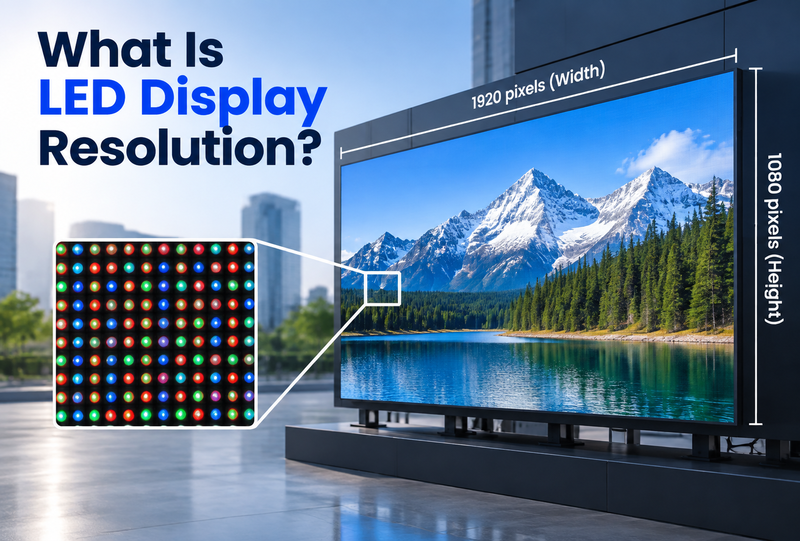
LED display resolution refers to the total number of pixels an LED screen can show, usually written as width × height, such as 1920 × 1080. In simple terms, it affects how much visual detail the display can present.
However, buyers often confuse LED display resolution with pixel pitch. Resolution is the total pixel count of the complete screen, while pixel pitch is the physical distance between the centers of two neighboring pixels. Both affect image quality, but they are not interchangeable.
For DOOH operators, system integrators, property developers, stadium operators, educational institutions, and public-sector buyers, understanding this distinction is important. The right display is not automatically the one with the highest number of pixels. It is the one that provides clear, effective content at the intended viewing distance while fitting the site, operating conditions, and project budget.
This guide explains LED display resolution, its relationship with pixel pitch and screen size, and how to choose the most suitable configuration for your application.
What Is LED Display Resolution?
LED display resolution is the number of physical pixels arranged across the width and height of an LED screen. It is typically expressed as:
Resolution = Horizontal Pixels × Vertical Pixels
For example, a display with 1,920 pixels across and 1,080 pixels down has a resolution of 1920 × 1080, commonly known as Full HD or 1080p.
Higher resolution usually means the screen can display more image information. This can improve the appearance of fine text, detailed graphics, spreadsheets, maps, high-definition video, and close-viewing content. Yet resolution alone does not define whether a display will look sharp in a real project. Physical screen size, pixel pitch, viewing distance, content design, and ambient conditions also matter.
Common LED Display Resolutions
Many LED display projects are designed around familiar content formats:
| Resolution Standard | Pixel Resolution | Typical Use |
| HD / 720p | 1280 × 720 | Basic high-definition video and smaller-format displays |
| Full HD / 1080p | 1920 × 1080 | Commercial signage, presentation content, event visuals, standard 16:9 video |
| QHD / 1440p | 2560 × 1440 | Detailed visual content and higher-resolution display applications |
| 4K / UHD | 3840 × 2160 | Premium advertising, immersive displays, large-format visual experiences |
| 8K | 7680 × 4320 | Extremely high-detail applications with suitable content and viewing conditions |
These are useful reference points, but an LED wall does not have to match one of them exactly. Unlike a fixed-size monitor, a large-format LED display is assembled from modules or cabinets. The chosen pixel pitch and the number of units across and down determine the finished screen’s native resolution. A wide billboard, for example, may have a pixel layout that does not correspond to any standard 16:9 format.
LED Display Resolution vs. Pixel Pitch vs. Screen Size
Resolution, pixel pitch, and screen size are closely related, but each describes a different part of the display specification.
| Term | What It Means | Why It Matters |
| LED display resolution | Total pixels across the screen, such as 1920 × 1080 | Determines how much visual information the screen can display |
| Pixel pitch | Center-to-center distance between adjacent pixels, measured in millimeters | Affects pixel density, close-viewing clarity, and likely viewing distance |
| Screen size | Physical width and height of the display | Determines visual impact, installation requirements, and the total pixel canvas possible |
1. Resolution: The Pixel Canvas
Resolution tells you how many pixels the display contains. A screen with 3840 × 2160 pixels has more than eight million pixels, while a 1920 × 1080 display has just over two million.
More pixels can support greater content detail. This is particularly relevant for a high-resolution LED display used in close-viewing environments, including retail spaces, corporate lobbies, transport hubs, command centers, university facilities, exhibition halls, or premium street furniture.
Still, a high-resolution signal does not automatically guarantee a high-resolution viewing experience. If the screen’s physical pixel grid is too coarse for the viewing distance, fine content detail may not be visible.
2. Pixel Pitch: The Physical Pixel Spacing
Pixel pitch is the distance between the centers of adjacent pixels. A P2.5 LED display has a 2.5 mm pitch, while a P10 display has a 10 mm pitch.
A smaller pitch places pixels closer together. This generally produces a finer image and makes the screen more suitable for closer viewing. A larger pitch spreads pixels farther apart, which may reduce close-up detail but can remain highly effective when viewers are farther away.
For example, P2.5 or P3.9 may be appropriate where pedestrians, shoppers, or venue visitors will stand near the display. P8, P10, or larger-pitch products can be a more practical choice for large outdoor billboards, stadium screens, highway-facing signage, and landmark displays viewed from longer distances.
3. Screen Size: The Physical Display Area
Screen size refers to the actual dimensions of the LED display, such as 6 m × 3 m or 12 m × 6 m. A bigger screen creates greater visibility and impact, but it does not automatically mean a sharper image.
The relationship can be simplified as follows:
Pixel Count ≈ Screen Dimension ÷ Pixel Pitch
For instance, a 1920 × 1080 LED screen using a 6 mm pixel pitch would measure approximately:
1920 × 0.006 = 11.52 m wide
1080 × 0.006 = 6.48 m high
In other words, the same Full HD resolution can require very different physical screen sizes depending on the pitch. A smaller pitch can achieve the same resolution in a more compact display, while a larger pitch requires a larger display area to reach the same pixel count.
How to Choose the Right LED Display Resolution
Choosing the right LED display resolution means deciding how many pixels the screen needs to display content clearly at its intended size and viewing distance. The goal is not simply to specify 4K or 8K. Instead, buyers should first determine the level of detail the audience needs to see, then select a screen size and pixel pitch combination that delivers an appropriate native resolution.
For example, a display that must show presentation slides, detailed product images, maps, menus, or live data may require a higher native resolution than a screen used mainly for large advertising graphics or short public messages. Furthermore, if the content is designed in Full HD, a screen with a native resolution close to 1920 × 1080 can display it with minimal scaling.
1. For Close Viewing: Target Higher Resolution
Close-viewing applications generally need a higher LED display resolution because viewers can notice pixel structure and image detail more easily. To achieve more pixels within a given screen size, select a smaller pixel pitch.
| Typical Viewing Distance | Suggested Pixel Pitch | Resolution Target and Typical Use |
| 1–2.5 m | P0.9–P1.5 | High pixel density for detailed content; suitable for control rooms, studios, premium boardrooms, and high-end retail |
| 2.5–5 m | P1.5–P2.5 | Often suitable for Full HD or higher-resolution screen configurations in lobbies, meeting rooms, museums, and exhibition spaces |
| 5–8 m | P2.5–P3.9 | Suitable for clear Full HD content, video, and presentation visuals in auditoriums, showrooms, and indoor signage applications |
For instance, a 4.8 m × 2.7 m screen with P2.5 pixel pitch can achieve approximately 1920 × 1080 pixels. That gives the display a Full HD native resolution and a standard 16:9 format, making it well suited to common presentation and video content.
2. For Long-Distance Viewing: Avoid Unnecessary Resolution
Long-distance applications do not always require a high-resolution LED display. When viewers are 10 m, 20 m, or farther from the screen, they are less likely to see fine pixel-level detail. In these cases, a larger pixel pitch can provide sufficient native resolution while allowing a larger display area or a more cost-effective project.
| Typical Viewing Distance | Suggested Pixel Pitch | Resolution Strategy and Typical Use |
| 10–20 m | P4–P8 | Moderate resolution for large advertising graphics, video, and public messaging |
| 20–40 m | P8–P10 | Prioritize readable content, screen scale, brightness, and contrast for billboards, transit media, and stadiums |
| 40 m and beyond | P10–P16+ | Use a resolution appropriate for bold, long-range visuals on roadside DOOH, façades, and landmark displays |
3. Match the Specification to the Project
Before specifying a target resolution, confirm the available screen dimensions and installation conditions. Will cabinets fit the proposed wall? Is the display indoors or exposed to daylight and weather? Is access needed from the front or rear for maintenance? These factors can affect which product configuration is practical.
Also consider the content workflow. A 16:9 presentation may need a different layout plan from a long stadium ribbon or an irregular architectural display. Your system integrator should confirm how source content will be mapped or scaled to the finished wall.
Finally, compare suitable configurations within the project budget. Smaller pitch usually means more physical pixels over the same area, so it should serve a clear viewing or content need. The goal is an LED display resolution that communicates effectively at the installed size—not the highest figure on a specification sheet.
Partnering with Chainzone for Your Display Needs
Choosing the right display parameters requires expertise, and that is where a professional manufacturing partner becomes invaluable.
Since 2000, Chainzone has been a globally recognized LED display manufacturer, delivering intelligent commercial and traffic display solutions to operators across more than 54 countries. We understand that businesses and institutions—from stadium operators to DOOH networks—require reliable, high-performance visual solutions tailored to their exact environments.
At Chainzone, we offer an extensive portfolio of pixel pitch options to meet diverse application needs. For projects demanding ultra-fine, seamless indoor details, our E-Fine series (available in P1.9 and P2.9) delivers stunning high-definition clarity. For large-scale outdoor projects requiring rugged durability, our V-Plus and Plus X series offer robust, high-brightness solutions with larger pitches perfectly suited for long-distance impact.
| Product Series | Pixel Pitch Options (mm) | Ideal Application | Key Technologies & Features | Max Brightness |
| E-Fine Series | P1.95, P2.98 | Premium Viewing Environments | 3840Hz Refresh Rate, IP65 Protective Design, Seamless Clarity | High Brightness |
| V-Plus Series | P8.33, P10, P16.6 | Large-Scale DOOH & Outdoor | Proprietary LOB Technology, Reduced Light Pollution, High Efficiency | Up to 10,000 nits |
| Plus X Series | P6.25, P6.35, P10.16, P10.4, P16.6 | Rugged Outdoor Efficiency | Mini LOB Technology, Ultra-low Power | Up to 10,000 nits |
Final Thought
Understanding LED display resolution is the first step toward a successful digital transformation. Don’t navigate the technical complexities alone. Let our 25+ years of industry experience guide you to the perfect display solution. Contact Chainzone’s professional team to explore our products and learn how our engineering team can help bring your next visual project to life!


